Deploy static files to Azure Storage with GitHub Actions
Status Quo
At this point, there’s a local working Hexo instance, its GitHub repo containing an action and a workflow to generate static Hexo content. The steps to get there are detailed in the previous post Automated Hexo build with GitHub Actions.
Now, I want to deploy this generated content from public/ to an Azure Storage, hosting a static website.
Azure deployment credentials
Research first, and unexpectedly, there is a documentation, matching my task surprisingly well.
At first, a service principal needs to be created via the Azure CLI.
1 | az ad sp create-for-rbac --name "My Service Principal" --role contributor \ |
If you’re running in a connection error like the following, a simple az login should do the trick.
1 | Failed to connect to MSI. Please make sure MSI is configured correctly. |
The output should then resemble to this:
1 | Creating 'contributor' role assignment under scope '/subscriptions/<subscription-id>/resourceGroups/<resource-group-name>' |
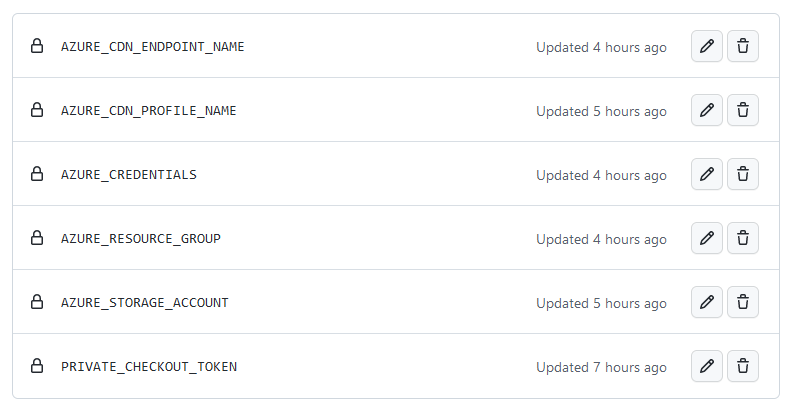
Now I created a AZURE_CREDENTIALS repository secret containing the JSON snippet of this output, as well as a secret for each of the following values:
- Azure Storage Account
- Resource Group
- CDN Endpoint Name
- CDN Profile Name
Update 2026: Azure CDN Retirement and Architecture Changes
In December 2025, Microsoft informed customers about the retirement of services associated with Azure CDN, including CNAME-based domain validation (DCV). According to Microsoft’s official roadmap, Azure CDN Standard from Microsoft (classic) will be retired in September 2027.
While the deployment approach described below remains technically valid, these announcements significantly changed the long-term outlook for architectures relying on Azure CDN or Azure Front Door in combination with Azure Storage static hosting.
Instead of continuing with a CDN-based setup, I took the opportunity to simplify the overall architecture, remove Azure Front Door and its recurring costs, and migrate to a zero-cost solution based on Azure Static Web Apps. This results in a leaner setup with fewer moving parts, native HTTPS support, and reduced operational overhead.
I documented the full migration, including the architectural reasoning and implementation details, in my migration from Azure Front Door to Azure Static Web Apps.
Deployment workflow
The pipeline should now execute the following steps:
graph LR

login(Login to Azure)-->upload(Upload content to Azure Storage)
upload-->purge(Purge CDN cache)
purge-->logout(Logout of Azure)
In workflow steps, this would look like:
1 | - name: Azure login |
But, what is the Purge CDN endpoint step for? If you have used the Azure CDN before, you may have experienced a caching-like behavior. This is the CDNs preloading functionality; and exactly this preloaded items can be purged.
💀 Pitfall - missing CDN Endpoint Contributor role
In my case, this Purge CDN endpoint step failed due to the CDN Endpoint Contributor role missing on the service principal. To manually assign this role, open the Azure portal, navigate to your subscription and open the Access control (IAM) blade, click on + Add and select Add role assignment.
- In the Role tab, select the CDN Endpoint Contributor role
- In the Member tab, click on + Select members
- In the opening sidebar, search for the previously created service principal and save
Then just Review + assign, and the job should work. The detailed steps can be found in the official documentation.
Storage cleaning
As I’m deploying static content, which may also be deleted or renamed from time to time, it may be necessary to clear the storage prior to uploading the content.
1 | - name: Clean storage |
I added this step but commented it out, as it seems to be very slow and needless most of the time.
Job separation
If we combine these steps with the workflow from the previous post Automated Hexo build with GitHub Actions, we’d end up with one massive job. This job could be split up into at least two, with separate concerns: build and deploy.
To share the build result, the static content in ./public, with both jobs, I opted for the GitHub Actions Cache.
1 | env: |
The important parts are: the job dependency created by needs: [build] and some kind of cache key; I utilized an environment variable. This variable should contain an at least semi-random value, to avoid race conditions while saving your build artefact to the cache:

The commit hash seemed to be sufficient: build_cache_name: hexo-public-content-${{ github.sha }}
Conclusion
That’s it, the workflow successfully deploys static content from a build directory to an Azure Storage Account. Surprisingly, there is enough documentation for each of the single tasks, though I had a hard time fixing the Azure role issue.
The complete workflow can be found at its dedicated GitHub repo.